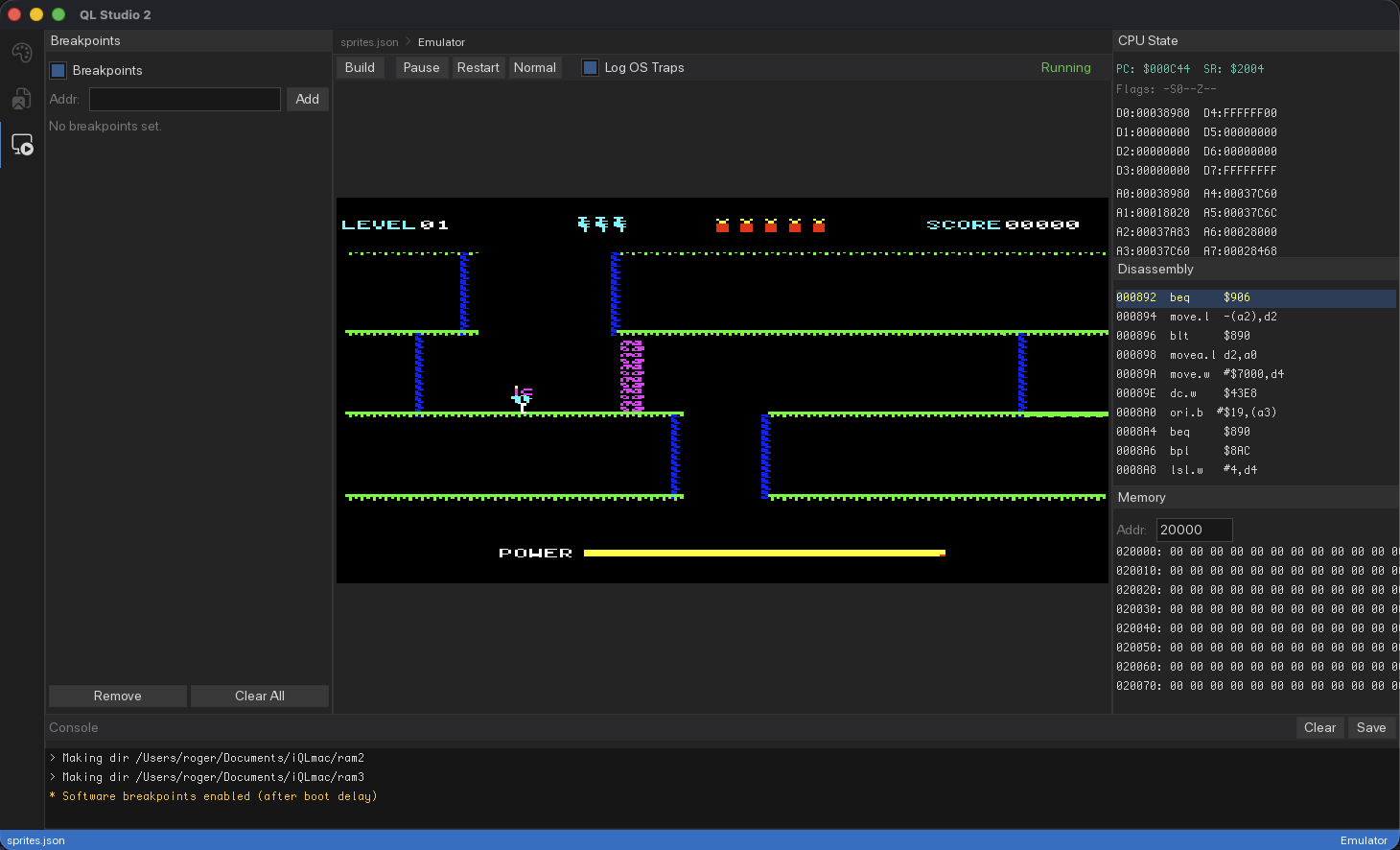
📺 Writing a Game for the Sinclair QL in C
I’ve wanted to write a game for the Sinclair QL for a long time. Not in SuperBASIC, not in 68K assembly — in C, cross-compiled from my Mac. How hard could it be?
Pretty hard, at least for me as it turns out.
Why the QL
The QL is a strange machine. Clive Sinclair launched it in 1984 with a Motorola 68008 at 7.5 MHz, 128KB RAM, and those infamous microdrives. It was marketed as a business computer but it has something most 8-bit home computers of the era didn’t — a real multitasking operating system (QDOS) and a processor from the same family as the Macintosh and Amiga. The 68008 runs the full 68000 instruction set. It just does it through an 8-bit data bus, which makes everything roughly twice as slow as it should be.
I chose to write R.E.S.C.U.E. (Remote Exploration & Sub-surface Cavern Utility Expert) — a cave exploration platformer with a propeller pack, laser, dynamite, and enemies. Small enough to finish, complex enough to hit every hard problem: pixel graphics, keyboard input, sprite animation, collision detection, and keeping it all fast enough to be playable.
The Toolchain
I wanted to use vbcc — the portable C compiler from the Amiga community. I already had it installed as part of my Atari ST cross-development setup, and since the Atari ST and the QL share the same CPU family, the compiler output is compatible. The toolchain:
- vbccm68k — compiles C to 68K assembly
- vasm68k_mot — assembles to object files
- vlink — links into an executable
The catch is that vbcc’s Atari ST target produces TOS executables, not QDOS jobs. And QDOS has very specific ideas about how executables should work.
The Relocation Problem
This was the wall I hit face-first and spent some time getting past.
vbcc generates absolute addresses for every function call and every global variable access. jsr _main encodes the address of main() as a fixed number baked into the binary. On the Atari ST this is fine — TOS performs relocation at load time, adjusting all those addresses to match where the program actually landed in memory. QDOS doesn’t do this. It loads your binary at whatever address it allocates and jumps to byte zero. Every absolute address in the code still points to address zero-something, which on the QL is ROM. Every function call, every variable access — all wrong. Instant crash.
First attempt: raw binary, hope for the best. The program set the display mode (that worked — the trap instruction doesn’t use absolute addresses) and cleared screen memory to black (also fine — 0x20000 is always the screen, it’s a hardware address). But the moment it tried to call a C function or read a variable, nothing.
Second attempt: link at a fixed address and hope QDOS loads it there. Too fragile, doesn’t actually work.
The solution that actually works: link as a TOS executable, which includes a relocation table — a compact list of every absolute address in the binary that needs adjusting. Then a C tool I have written (tos2ql.c) wraps the binary with a 36-byte 68K machine code stub. At startup, before the C code runs, this stub:
- Computes its own actual address using the program counter
- Walks the relocation table (1,400+ entries)
- Adds the load offset to every absolute address in the binary
- Jumps to the C entry point
After patching, all the function calls and variable accesses point to the right places. The program runs.
The file also needs a Q-emulator header (30 bytes prepended) so sQLux recognizes it as an executable with the correct data space allocation.
The Makefile pipeline: vbcc → vasm → vlink → tos2ql.c → rescue. Type make deploy and it builds, converts, and copies to the emulator’s virtual drive.
Mode 8 Pixel Format
The QL’s display gave me the second headache. Mode 8 is 256×256 pixels with 8 colors, which sounds straightforward. The pixel encoding is anything but.
Screen memory is organized as pairs of bytes. The even byte carries the green color plane, the odd byte carries the red and flash (blue) planes. Each pair encodes 4 pixels, but the bits for each pixel are at specific positions within both bytes:
- Pixel 0: bit 7 of even byte = green, bits 7 and 6 of odd byte = flash and red
- Pixel 1: bits 5 and 4
- Pixel 2: bits 3 and 2
- Pixel 3: bits 1 and 0
To write all 4 pixels as white, you write 0xAA to the even byte and 0xFF to the odd byte. Red is 0x00 and 0x55. Green is 0xAA and 0x00. I had to discover this experimentally — my first test drew “yellow dotted lines” and “blue blinking bars” because I assumed the bytes were simple nibble-packed pixels. They’re not.
I built a pure assembly test — 66 bytes, no C — that wrote colored bars to screen memory. When the colors finally matched what I expected, I knew the encoding was right and could build the C rendering on top of it.
Mode 8 Color Reference
| Color | Even byte | Odd byte |
|---|---|---|
| Black | $00 |
$00 |
| Red | $00 |
$55 |
| Green | $AA |
$00 |
| Yellow | $AA |
$55 |
| Blue | $00 |
$AA |
| Magenta | $00 |
$FF |
| Cyan | $AA |
$AA |
| White | $AA |
$FF |
Rendering Without a GPU
The 68008 has no hardware sprites, no blitter, no scroll registers. Every pixel is written by the CPU through the 8-bit data bus. A full screen copy (32KB) takes nearly 100ms byte-by-byte, so you absolutely cannot redraw the screen every frame.
The approach: when entering a new cave room, draw the static background (walls, lava, destroyable blocks) once into a 32KB buffer allocated from the QDOS heap. Copy it to screen memory using longword writes (4 bytes at a time — about 6× faster than byte copies despite the 8-bit bus, because the 68008 handles the bus multiplexing internally). Then for each frame, only the moving elements are touched.
Sprites (player, enemies, dynamite) use a background-restore technique: before drawing a sprite at its new position, the background buffer restores the pixels at the old position. The erase and redraw happen back-to-back per sprite — this is critical because if you erase ALL sprites then redraw ALL sprites, the gap is visible as flicker. Per-sprite erase-draw keeps the gap to microseconds.
For stationary sprites — the miner sitting in the cave, the player standing still — the renderer detects that nothing changed and skips the erase/redraw entirely. Zero flicker, zero cost.
The cave walls come from polyline data — sequences of (dy, dx) deltas defining connected line segments. About 90% of segments are axis-aligned (horizontal or vertical). I wrote fast hline and vline functions that pre-compute the Mode 8 byte values and write directly, bypassing the per-pixel plot routine. Only diagonal segments use the slower Bresenham algorithm. This makes room transitions roughly 5× faster than plotting every pixel individually.
QDOS — The Things You Can’t Do in C
QDOS system calls use 68K TRAP instructions with arguments in specific registers. You can’t express “put 8 in d0, put -1 in d1, execute trap #1” in portable C. The hardware layer is a small assembly file (~200 lines) that wraps six QDOS calls as C-callable functions:
- ql_init — sets Mode 8, clears screen, opens a console channel for keyboard input
- ql_cleanup — closes the console channel
- ql_read_keys — non-blocking keyboard poll via IO.FBYTE, maps QL key codes to game flags
- ql_wait_frame — suspends the job for 3 ticks (~60ms) using MT.SUSJB for consistent frame timing
- ql_alloc — allocates memory from the QDOS common heap via MT.ALCHP
Getting the keyboard right took trial and error. The QL cursor keys return codes 0xC0 (left), 0xC8 (right), 0xD0 (up), 0xD8 (down) — not obvious, not well documented, and I had them scrambled on the first three attempts.
The frame timing uses MT.SUSJB (suspend job) with a 3-tick timeout. At 50 Hz, that gives roughly 30 FPS — adequate for the game and polite to QDOS multitasking. All the game physics constants (gravity, walk speed, thrust) are scaled for this frame rate.
The HUD Problem
Drawing text on the QL means plotting individual pixels for each character of each digit. A 4×6 pixel font with a full draw of the HUD (level number, lives, dynamite count, score, fuel bar) costs hundreds of plot_pixel calls. At 16 FPS, you cannot afford to redraw the HUD every frame.
The solution: dirty tracking. Each HUD element remembers its last drawn value. Score only redraws when it changes. Lives only redraw when you die. The fuel bar only updates when fuel decreases. On a typical frame where nothing happened, the HUD costs zero CPU time.
The fuel bar itself is two horizontal lines drawn with the fast hline primitive — cyan when above 25%, yellow when low. It appears immediately when the game starts.
Explosions, Lasers, and Spiders
The dynamite explosion draws an expanding cross pattern — horizontal and vertical lines radiating outward from the blast center, white fading to yellow. Using hline and vline makes this cheap enough to animate smoothly.
The laser beam is a single-pixel horizontal line. No sprite needed — just one hline call when active, one background restore when it deactivates.
Spiders were the trickiest. They hang from a thread and patrol vertically. The thread is a column of pixels that has to move with the spider and vanish completely when the spider dies. The renderer erases the spider’s entire patrol column (anchor point to maximum descent) from the background buffer before each redraw. When the spider is killed by the laser, the same full-column erase catches the thread. No leftover pixels.
What I Learned
The QL is a surprisingly capable little machine once you get past the toolchain hurdles. The 68000 instruction set is pleasant to work with. QDOS is genuinely multitasking. Mode 8 is weird but workable. The real challenges are all in the infrastructure — getting the binary to load, getting the pixels to show the right colors, getting the keyboard to respond.
If I were starting over, I’d build the self-relocating loader first and a minimal pixel test second. Those two things — “can my code run” and “can I see correct pixels” — are the foundation everything else depends on. I wasted too much time on game logic that I couldn’t test because the binary wouldn’t even start.
The game runs in sQLux (open-source QL emulator) with a small SuperBASIC launcher that clears the screen, runs the game, and loops. Testing on real hardware via SD card adapter is next.
The QL deserved more games in 1984. Here’s one, 42 years late, written in C and cross-compiled from a MacBook. Sir Clive would probably have had opinions about that.
What’s next?
n my next post, I’ll dive deeper into the toolset I’ve developed and provide a first look at QL Studio, the platform I built to sit on top of it.